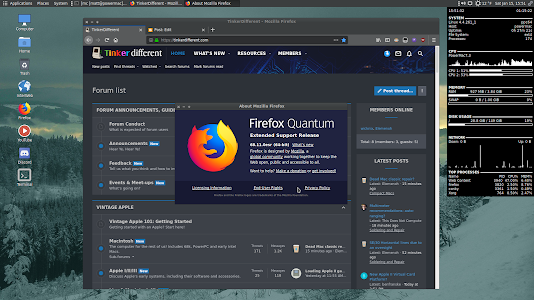
It took fixing 2 files in freebl (part of NSS) but i got current Pale Moon to build on VoidPPC64. (glibc version)
Download the generic branding build from here.
At least i think so. I mean i can still watch Twitch.tv streams, watch YouTube, chat on Discord and IRC, browse most of the modern web, listen to pandora radio, and of course all the other odds and ends a casual user would require. Some may disagree, but it still works for me.
This is an UNOFFICIAL Mac G5 xbps package for Void ppc64 (glibc).
It's safe to use, even though it's a bit of a hack.
Recent updates have broken Firefox 91/95 (bad colors) and libicu
was updated which broke interweb and older versions of firefox-esr.
With the help of a few discord and macrumors members i was able to
track down some of the older icu libraries and firefox builds. I did have to
compile libicu-69.1 however for FF78.
Anyway, this package will install:
Arctic Fox 27.12.0
InterWeb 20201108
Firefox 68.11-esr
Firefox 78.14-esr (has some minor color issues)
and all the required libraries, .desktop files, and icons.
The browsers themselves will install to /opt.
The libraries and icons will go where they need to be in /usr.
This will also create the proper menu entries.
To install void64-browsers-1.0_1.ppc64.xbps (740mb installed)
sudo xbps-install firefox-esr (to pull in FF91 and it's dependencies)
sudo xbps-install xtools
then
cd /path/to/void64-browsers-1.0_1.ppc64.xbps
then
sudo xdowngrade void64-browsers-1.0_1.ppc64.xbps
IMPORTANT:
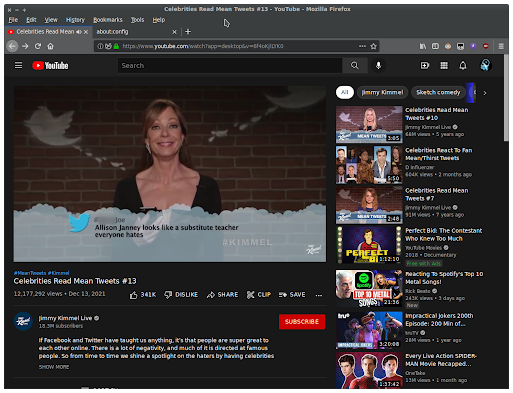
To get YouTube working in both Firefox's open about:config
Search for webm, and disable all 4 lines (double click to false)
Also FF68 and 78 use different profile locations, so
they wont share bookmarks, passwords, etc.
They can be used without interfering with each other.
Arctic Fox is less capable, but very light on resources.
InterWeb is a great all around light weight browser.
Firefox 68 is the best for YouTube,
and Firefox 78 is good for google drive, docs, etc.
Over the years i've watched the powerpc challenge from afar. This year i figured what the heck, why not?
Now the challenge really isn't a challenge to me because i use my powerpc macs pretty much every day, and i have found ways to make "modern computing" work for me on these 15-20 year old machines.
I started week 1 of the challenge on my 2ghz dual processor G5 w/4gb of ram running Void Linux. Yes, a modern 2021/2022 operating system and software running on a G5. Here are some of the things i was able to do effortlessly.
(Click the images for full resolution)
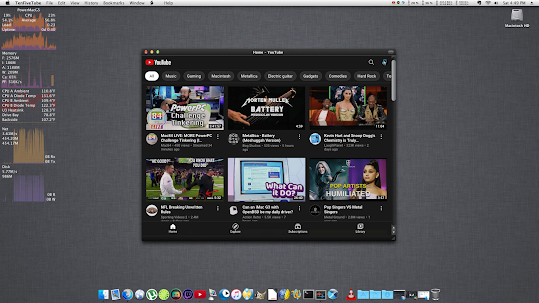
Watched mac 84's YouTube live stream in 480p via streamlink
Watched a Twitch.tv live stream in 720p via streamlink (and a custom script)
Watched some regular YouTube in 720p via pipe-viewer
Chatted on Discord (using the web app via the Eolie web browser)
That about covers my basic computing needs. Can the machine do more? Sure.
Now do i use my 12" PowerBook G4 for week 2? Or stay on the G5? Hmmm.
Maybe i'll make a video. More to come....
Tuesday the 11th.
Booted the Adelie Mate live disk on my G5 to see if i could help those without sound. You can read my post about it here.
Saturday the 15th
Played around with the Adelie Linux ppc64 Mate live disk again. Contemplated on installing it, but i really like VoidPPC, and it's updated a lot more frequently.
I also found in my xbps cache (on Void Linux) the older firefox-68.11-esr and also the libicu.67 libraries it requires to run. I packaged them up for users that need a newer firefox for certain websites, and also have the endianness color issues with firefox 95 on Void 64-bit like i did. Just extract it, then copy or move its contents to /usr/lib. Grab the archive here.
Later in the day on the 15th
Just wanted to showcase what 10.5.8 Leopard can still do quite well if you're afraid of Linux.
Do office stuff with a semi modern LibreOffice 5 from 2016
Install macports and compile some new and useful software
More to come as we have a few days of the challenge left....
Sunday the 16th
As promised, here is a short video using my 12" PowerBook G4 which is also running Void Linux. Sorry for the lack of decent lighting and video quality (cheap phone).
Discord web on a 12" 1.33ghz Powerbook G4
I watched 4 hours of Mac84's 9 hour live stream on the 12" PowerBook
Space Cadet Pinball on the 12" PowerBook
Sunday evening
Figured i might as well show some MorphOS stuff as well. I have a registered copy on my 1.5ghz MacMini G4, and the demo version on my 1.6ghz G5 which i will eventually register.
My MorphOS desktop
Browsing the web with a 2021 webkit based browser (Wayfarer)
Played some Prince of Persia as well.
Thursday the 20th
Fired up the 17" PowerBook G4 running Tiger and watched another live stream via PPCMC. I changed it's look at bit with ShapeShifter and the brushed 3.5 theme.
Tuesday the 25th
I got YouTube working on Firefox 68 with VoidPPC and Adelie Linux on my G5. Simply open about:config, search for webm, and double click each line to disable webm. Restart Firefox and enjoy. Slower machines might want to use a mobile user agent string for faster loading. I tested this string and it works well.
Mozilla/5.0 (Linux; Android 8.0.0; Pixel Build/OPR3.170623.008) AppleWebKit/537.36 (KHTML, like Gecko) Chrome/61.0.3163.98 Mobile Safari/537.36 CPUuse hovers around 70% @360p on a dual 2ghz G5.
I think that about does it for me for this years challenge. I know there are a few days left, but work and wife take precedent over my man cave shenanigans during the week. I hope you enjoyed the screen shots, and maybe you saw something that peaked your interest. There's lots of life left in these old machines with the right OS and software.